
CELPIP Blog
Fix CELPIP Spelling Mistakes with a 4 Step Proofreading Routine
Fix CELPIP Spelling Mistakes with a 4 Step Proofreading Routine

Yes, CELPIP flags spelling mistakes with an on-screen spell checker, but it will not auto-correct them for you. The checker underlines a misspelled word and offers suggestions, but the wrong word stays wrong until you accept a suggestion or retype it yourself. The single biggest fix: save two or three minutes at the end of each writing task to review every flagged word and confirm you’ve chosen the correct one, not just the one that looks closest.
TL;DR:
- The CELPIP spell checker flags errors but does not automatically correct them, requiring test-takers to review flagged words carefully before submitting.
- Common mistakes include fast-typing typos, homophones, capitalization errors, British versus American spelling, and hyphenation issues, often worsened by time pressure.
- A four-step proofreading loop—focusing on proper nouns, homophones, doubled or omitted letters, and flagged suggestions—can be practiced repeatedly to become automatic.
- Using mock exams that replicate the test interface, including spell-check behavior, helps develop consistent correction routines under pressure.
- Tracking personal error patterns and drilling those specific mistakes improves spelling accuracy more effectively than memorizing random words.
Table of Contents
- How the CELPIP spell checker works and its practical limits
- Common spelling mistakes on CELPIP and why they occur
- A short, memorisable in-test correction checklist
- Practice strategies and tools to reduce spelling errors
- Time management and a rehearsable proofreading routine
- What years of watching students prep actually taught me
- Practise the exact routine with Celpipguide
- Sources
- FAQ
How the CELPIP spell checker works and its practical limits
The CELPIP writing test runs on a computer interface, and it does include a live spell checker. When you finish typing a word and move to the next one, the software checks it against its dictionary. Misspell something, and you’ll usually see an underline with a small dropdown offering two to four alternative spellings. Click the one you want, and it drops into place. Ignore it, and the misspelled word sits there, uncorrected, until the test ends.
That’s the whole mechanism, and it’s worth understanding because a lot of test-takers assume the software works more like a phone’s autocomplete. It doesn’t. The CELPIP spell checker flags but never fixes anything automatically, which means the responsibility to act on the flag sits entirely with you.
The tool has real blind spots:
- It cannot tell you whether you’ve used the right word, only whether the word you typed is spelled correctly on its own.
- It won’t catch capitalization errors on proper nouns, cities, or personal names.
- Suggestion lists are short. If the correct word isn’t among the two to four options shown, you’re on your own.
- It won’t flag British versus American spelling variants as wrong. Both “colour” and “color” will often pass, so consistency is on you.
In-test, treat every flag as a decision point. If you recognize the correct spelling immediately, accept the suggestion. If you’re not sure the suggestion is even the word you meant, delete it and retype from scratch. That second habit catches more real errors than clicking the first option in the dropdown.
Common spelling mistakes on CELPIP and why they occur
Most spelling errors on this exam fall into five recognizable categories, and each one has a different root cause. Knowing which bucket your mistakes fall into makes practice far more efficient than memorizing random word lists.
- Fast-typing typos. Doubled letters, dropped letters, or swapped adjacent keys (“recieve” instead of “receive,” “teh” instead of “the”). These happen because you’re typing under time pressure and your fingers outrun your attention.
- Homophones and wrong-word choice. “Their/there/they’re,” “affect/effect,” “advice/advise.” These slip through spell check because every version is a real, correctly spelled word. The checker has no way to know which one fits your sentence.
- Capitalization slips. Missing capitals on proper nouns, city names, or the start of a sentence after a comma splice. This is a proofreading gap, not a spelling gap, but it costs marks the same way.
- British versus American variants. “Colour” versus “color,” “organise” versus “organize,” “centre” versus “center.” Neither is wrong on its own, but mixing both spellings in the same response reads as careless.
- Compound words and hyphenation. “Well known” versus “well-known,” “everyday” versus “every day.” These trip up candidates whose first language doesn’t use compounding the same way English does, a pattern often called L1 interference.
Time pressure amplifies all five. When you’re racing the clock in Task 2, your brain reverts to phonetic spelling (“recomend,” “definately”) because sounding out a word is faster than recalling its exact letters. That’s a normal cognitive shortcut under stress, not a sign you don’t know how to spell. The fix isn’t cramming more vocabulary. It’s building a personal error log so you know exactly which of these five categories trips you up most often, then drilling that specific pattern until it stops happening.
A short, memorisable in-test correction checklist
Running the same four-pass check every time turns proofreading from a vague “read it over” habit into something you can execute in under three minutes, even with adrenaline running high.
- Scan for capitalization and proper nouns first. Names, cities, organizations, and the start of every sentence. These errors are the easiest to fix and the easiest to miss if you skip straight to spelling.
- Check homophones and wrong-word choice second. Read each sentence for meaning, not just spelling. Ask “is this literally the word I meant?” rather than “is this spelled correctly?”
- Hunt for doubled or omitted letters third. This catches the fast-typing typos that cluster around long or unfamiliar words.
- Deal with every flagged suggestion last. Decide, word by word, whether to accept the suggestion or delete and retype. Don’t click through the dropdown just to clear the underline.
Pro Tip: Read the last word of each sentence backward through the sentence, out loud in your head. Reversing the reading order breaks the pattern your brain expects and makes typos and wrong words jump out far more than a normal left-to-right skim.
One habit worth building early: treat every spell-check suggestion as a prompt to verify meaning, not as an automatic correction. A surprising number of wrong-word errors survive the suggestion box because the suggested word is spelled correctly and simply isn’t the word the sentence needed. Run this four-step loop enough times in practice and it stops feeling like a checklist. It becomes reflex, which is exactly what you need when the clock is running down on Task 2.
Practice strategies and tools to reduce spelling errors
The fastest way to stop repeating the same spelling mistakes is to stop treating them as random. Pull your last five practice responses and log every error by category: typo, homophone, capitalization, variant spelling, or compound word. Most candidates find that ten recurring errors account for the bulk of their spelling losses, and drilling those ten specific words does more for your score than reviewing a generic 500-word spelling list.
A few habits worth building into your prep schedule:
- Timed mock writing with a dedicated review window. Give yourself the same four to five minutes at the end of every practice task that you’ll use on test day, so the habit is already automatic before you sit the real exam.
- Simulate the actual exam interface wherever you can, including free sample environments like Paragon’s online sample test, so the spell-check behaviour you’re rehearsing matches what you’ll actually see.
- Use an AI writing checker to spot patterns, not to write for you. Tools like Celpipguide’s free writing checker or AmmarAI’s grammar checker can flag recurring error types fast, but the value is in what the feedback teaches you about your own habits, not in letting software fix the sentence for you.
- Turn off your browser or OS spell-checker during mock simulations. Chrome and other browsers apply their own spell-check logic, which behaves differently from the CELPIP interface. Practising with it on trains you to rely on suggestions you won’t actually get on test day.
If persistent errors keep surfacing in the same categories, working through them with a tutor, such as through Trinity Education Centre’s English tutoring, can help target exactly where the confusion is coming from.
Time management and a rehearsable proofreading routine
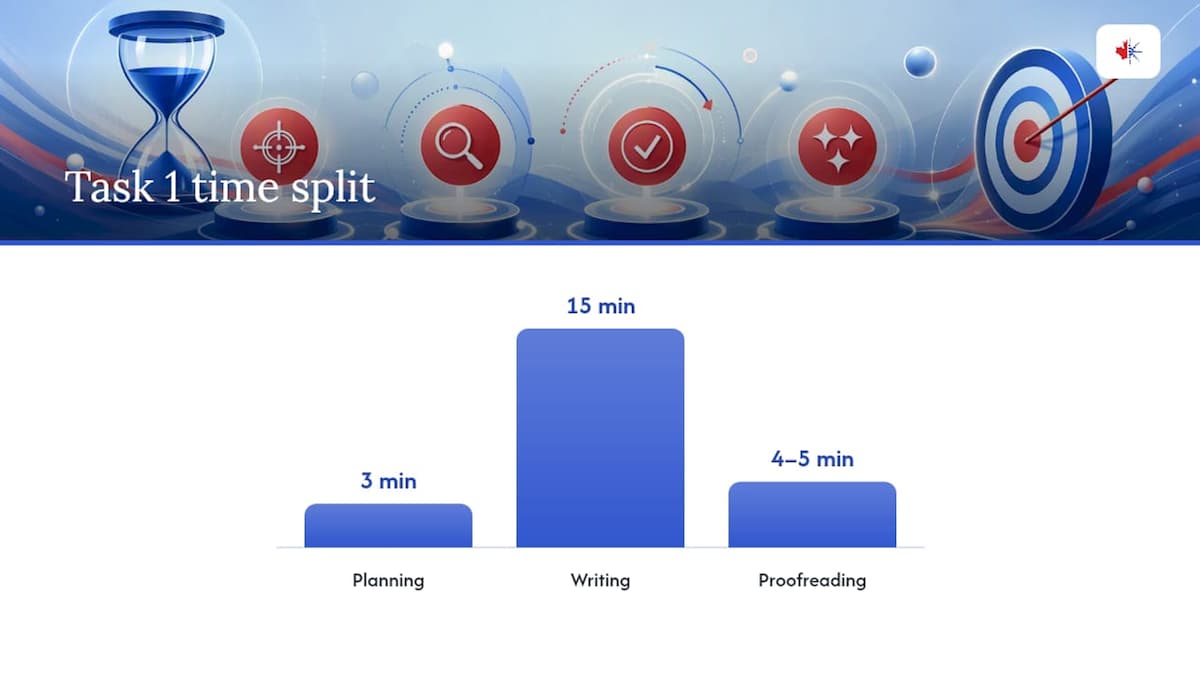
For Task 1, a workable split is roughly 3 minutes planning, 15 minutes writing, and 4 to 5 minutes reserved purely for proofreading. Task 2 runs on a similar rhythm: brief planning, most of the clock spent writing, then a fixed review window you never skip, no matter how the writing itself went.
That review window should run the same four-step loop every single time:
- Scan for proper nouns and capitalization first.
- Check homophones and confirm each word matches your intended meaning.
- Look for doubled or omitted letters in longer words.
- Accept or retype every flagged suggestion, one at a time, rather than clicking through quickly.
The loop only works if it’s automatic, and automatic only comes from repetition. Run it in several full mock tests before test day, using consistent timing each time, so your hands and eyes execute the routine without you having to consciously think through the steps while the clock is ticking down.
What years of watching students prep actually taught me
The candidates who jump fastest usually aren’t the ones with the biggest vocabulary. They’re the ones who stop making the same three or four mistakes over and over, because they finally wrote them down and drilled them on purpose. A tight daily habit, even fifteen focused minutes, consistently beats a weekend of frantic cramming. Spelling gains come from noticing your own patterns, not from memorizing someone else’s list.
— Reza
Practise the exact routine with Celpipguide
Reading a checklist is one thing. Running it under real exam pressure, with the clock actually moving, is what makes it automatic. Celpipguide’s full-length mock exams replicate the CELPIP writing interface, including the spell-check behaviour, so you can rehearse the four-step proofreading loop in conditions that match test day rather than a quiet document with your browser’s spell-checker doing the work for you.
An AI writing checker gives instant, rubric-based feedback on your responses, which means you can build a personal error log more efficiently than reviewing your own work cold. Pair that with a personalised study plan built around your specific weak spots, whether that’s homophones, capitalization, or compound words, and vocabulary drills that target the exact patterns you keep repeating. Start with a readiness check to see where your spelling and grammar stand right now, and use the code BLG30 for 30% off your subscription when you’re ready to commit to the full practice hub.
FAQ
Is a CELPIP score of 7 considered good?
A CLB 7 is a strong, competitive score for most Express Entry and citizenship pathways, though your target should match the specific program’s benchmark requirement.
Can I prepare for CELPIP in three days?
Three days is enough time to learn the test format and rehearse the proofreading checklist, but it’s too short to fix deep-rooted spelling or grammar patterns, which respond better to consistent daily drills over several weeks.
Is CELPIP tougher than IELTS?
Neither test is objectively harder; CELPIP uses Canadian English and North American contexts throughout, which some candidates find more intuitive, while IELTS includes a wider mix of accents and formats that others prefer.
What does an IELTS score of 8777 equal in CELPIP?
Score conversions vary by skill and by the specific benchmark table an immigration program uses, so check the exact CLB equivalency chart for your application rather than relying on a single quoted conversion.